


Admin Setup
Set your Palworld admin password and gain admin privileges in-game.
Updated
Palworld Admin Setup
Setting up an admin password on your Palworld server lets you manage the server, kick and ban players, and run admin commands.
How Admin System Works
Palworld uses a single Admin Password to grant admin privileges. You set the password in the panel, then type /AdminPassword in-game with that password to unlock admin commands.
Without setting an admin password in the panel, no one can use admin commands. The password acts as the key to unlock all admin functionality.
Set the Admin Password
- Open your Palworld server in the Lagless control panel
- Navigate to the Settings tab
- Find the variables section.
- Find the ADMIN PASSWORD field
- Enter a strong password
- Save the changes
- Restart your server
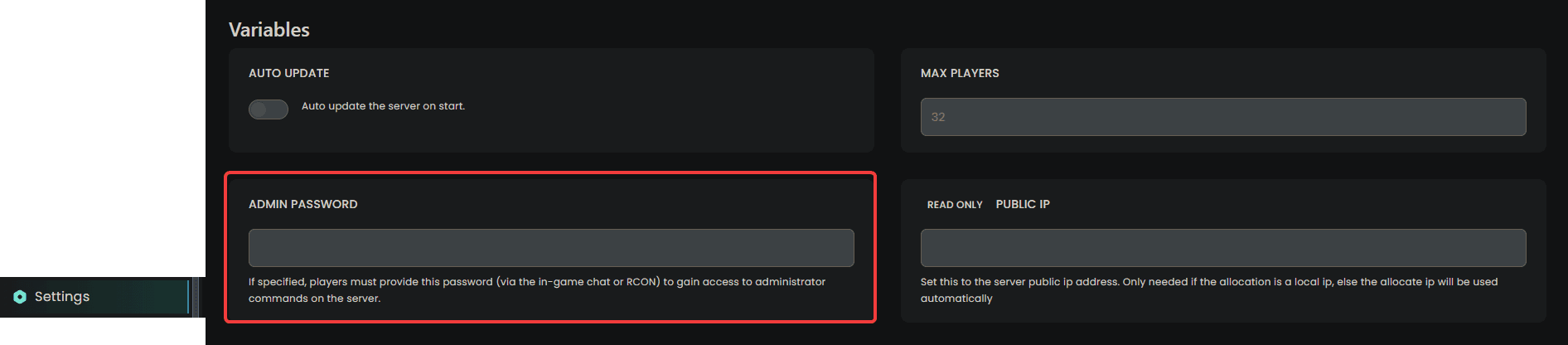
Choose a strong, unique password. Anyone with this password can use admin commands on your server.
Gain Admin Privileges In-Game
Once the server is running with your admin password set:
- Join your Palworld server
- Press
Enterto open the in-game chat - Type:
/AdminPassword YourPasswordHere
- Press Enter
- You'll see a confirmation that you're logged in as admin

You only need to enter the admin password once per session. It resets when you reconnect.
Multiple Admins
Any player who knows the admin password can gain admin privileges by typing /AdminPassword in the in-game chat. Share the password only with trusted players.
| Action | How |
|---|---|
| Grant admin | Share the password with the player |
| Revoke admin | Change the password in the panel |
| Remove all admins | Clear the password field in the panel |
Common Issues
"You don't have permission"
- Ensure you've typed
/AdminPasswordwith the exact password from the panel - Check that the admin password is set in the Settings tab, under variables in the control panel
Unknown command
- Check for typos
- this command is NOT case-sensitive
- Make sure you're typing in the in-game chat (not the panel console)
Changed the password but old one still works
- Restart your server after changing the admin password