


Admin Commands
Updated
Valheim Admin Commands
After you set up admin access, they can use commands to manage your Valheim server.
These become available after you set up admin access on your server. See Admin Setup for instructions.
Using Commands
Admins have two ways to use commands:
Method 1: In-Game Chat (Always Available)
- Press
Enterto open the chat - Type your command
- Press
Enteragain to execute
Method 2: Console (Requires Setup)
The console (F5) is disabled by default for all Valheim clients.
You can enable it by adding -console to your Valheim launch options in Steam:
- Right-click Valheim in your Steam library
- Select Properties
- Under Launch Options, add:
-console
- Launch the game – F5 will now work!
These commands work in both in-game chat and the console (if enabled). They do not work in the server console. You must be logged in as an admin to use them.
Available Commands
| Command | Effect | Note |
|---|---|---|
ban [name/ip/userID] | Bans the named user. | - |
banned | Shows a full list of banned users. | - |
kick [name/ip/userID] | Kicks the named user. | - |
resetworldkeys | Resets all world modifiers to default. | This does not reset gameplay progression keys. |
save | Forces the game to save. | - |
setworldmodifier [name] [value] | Sets a world modifier slider value. | - |
setworldpreset [name] | Resets all world modifiers to a named preset. | - |
unban [name/ip/userID] | Unbans the named user. | - |
Common Issues
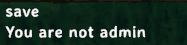
"You are not admin"
- Ensure you're listed as an admin
- Verify the SteamID has the
V_prefix
Console will show clearly when a command is executed successfully or if it fails.
 Not an admin? See Admin Setup to get started.
Command not recognized
- Check for typos
- Commands are not case-sensitive
- Make sure you're typing in the chat or console (not the server console or panel)
F5 console doesn't work
The console is disabled by default. Enable it via Steam launch options (-console).
"No feedback from chat"
- Admin or not, you will not receive feedback from the chat when executing commands. Check the server console for confirmation.
- F5 will show feedback in the console window.