


World Modifiers
Updated
Valheim World Modifiers
World Modifiers let you customize Valheim's difficulty and gameplay rules. You can adjust combat difficulty, death penalties, resource rates, raid frequency, and portal behavior. These become available after you set up admin access on your server. See Admin Setup for instructions.
The modifiers become visible in the F2 menu under World Modifiers.
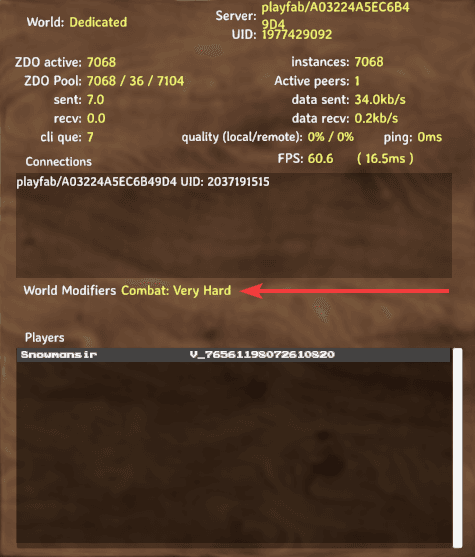
You must be an admin to change world modifiers. See Admin Setup if you haven't set up admin access yet.
Using Modifier Commands
Admins change world modifiers by typing commands in the in-game chat. These commands require admin privileges.
Set a Preset
Presets apply a complete set of modifier values at once. Use setworldpreset to apply one:
setworldpreset [name]
Available Presets
| Preset | Description |
|---|---|
Casual | No skill loss, relaxed combat. |
Easy | Weaker enemies, reduced skill loss. |
Normal | Default Valheim experience. |
Hard | Stronger enemies, increased skill loss. |
Hardcore | Permadeath. You lose all items and skills on death. |
Immersive | No map, no portals, harder combat. |
Hammer | No build cost, creative-style building. |
Setting a preset overwrites all previously set world modifiers. Apply presets before individual modifiers if you want to combine them.
Set a Single Modifier
Use setworldmodifier to change one modifier without affecting others:
setworldmodifier [name] [value]
Combat
Adjusts enemy difficulty, damage, and speed.
| Value | Effect |
|---|---|
veryeasy | Enemies deal 50% damage, you deal 125%. |
easy | Enemies deal 75% damage, you deal 110%. |
normal | Default damage values. |
hard | Enemies deal 150% damage, you deal 85%. |
veryhard | Enemies deal 200% damage, you deal 70%. |
Example:
setworldmodifier combat hard
Death Penalty
Controls what you lose when you die.
| Value | Effect |
|---|---|
casual | Keep equipped gear, lose 1% skill. |
veryeasy | Drop everything, lose 1% skill. |
easy | Drop everything, lose 2.5% skill. |
normal | Drop everything, lose 5% skill. |
hard | Drop equipped, destroy inventory, lose 7.5% skill. |
hardcore | Destroy everything, lose 100% skill (permadeath). |
Example:
setworldmodifier deathpenalty casual
Resources
Controls how many resources you get from mobs and lootable objects.
| Value | Effect |
|---|---|
muchless | 0.5x drop rate. |
less | 0.75x drop rate. |
more | 1.5x drop rate. |
muchmore | 2x drop rate. |
most | 3x drop rate. |
Example:
setworldmodifier resources muchmore
Resource rate does not affect fish, trophies, or boss drops. The game rounds up, so 1.5x effectively equals 2x for many drops.
Raids
Controls how often enemies raid your base.
| Value | Effect |
|---|---|
none | Disable raids entirely. |
muchless | Raids happen rarely. |
less | Raids happen occasionally. |
more | Raids happen often. |
muchmore | Raids happen very often. |
Example:
setworldmodifier raids none
Night raids still occur even when you set raids to none.
Portals
Controls how portals behave.
| Value | Effect |
|---|---|
casual | Allow all items through portals. |
hard | Disable portals near bosses. |
veryhard | Disable portals entirely. |
Example:
setworldmodifier portals casual
Reset All Modifiers
Use resetworldkeys to reset every world modifier to its default value:
resetworldkeys
This resets all modifiers, not just the ones you changed. Use it only when you want to start fresh with default settings.
This does not reset gameplay progression keys like boss kills or world events.
Common Issues
"You are not admin"
- Ensure you're listed as an admin
- Verify the SteamID has the
V_prefix
Command not recognized
- Check for typos
- Commands are not case-sensitive
- Make sure you're typing in the chat or console (not the server console or panel)
Can't reset a single modifier
Valheim does not support resetting one modifier at a time. Use resetworldkeys to reset everything, or setworldpreset Normal to restore defaults.